React Native vs Flutter: Which Cross-Platform Framework Fits Your App?
A deep dive comparison of React Native and Flutter, exploring why cross-platform tools exist, their core philosophies, developer experience, performance trade-offs, and key feature differences.
Why Cross-Platform? And why does it exist?
Typically, when developing a mobile application, you have two main technologies to choose from: Kotlin for Android, Swiftfor iOS. This can be cumbersome, as it requires maintaining two codebases, managing two teams, and dealing with double the number of bugs, which ultimately increases costs.
Cross-platform solutions emerged to address this issue by enabling a single codebase to work on both platforms. However, there is no perfect solution, and each option comes with trade-offs. The right choice ultimately depends on the specific product requirements.
For example, a resource-intensive 3D game or a video editor may necessitate native development to achieve optimal performance and provide deeper access to native APIs.
On the other hand, for most business applications, such as a food delivery app, performance only needs to be "good enough." In these cases, users are more concerned with reliability and efficiency than with achieving flawless performance. Therefore, the focus shifts towards saving time, reducing costs, and accelerating the delivery of the product to the market.
Same Business Logic, Different Philosophy
React Native and Flutter solve the same problem, but they approach it in completely different ways.
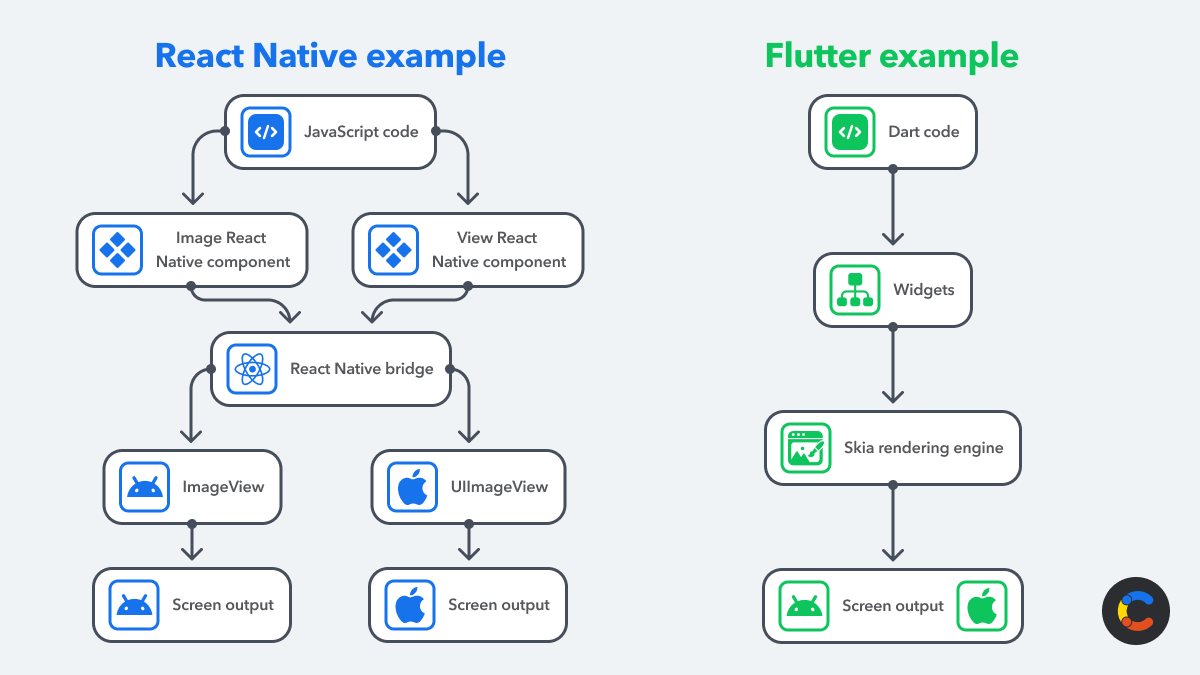
React Native takes the approach of using what already exists. You write JavaScript, and it sends commands to the native platform to render real UI components. So when you create a button, you’re actually using a real Android or iOS button behind the scenes.
This makes the app feel naturally native, but it comes with a trade-off. There’s a communication layer between JavaScript and the native side, which can add some overhead and complexity. Still, for most apps, that trade-off is worth it because you stay close to the platform.
Flutter, on the other hand, plays a completely different game.
Instead of relying on native components, Flutter builds everything itself. It uses its own rendering engine (similar to how a game engine works) and draws every pixel on the screen from scratch.
This gives you full control over the UI, smoother animations, and consistent design across all platforms. But the downside is that it doesn’t feel “naturally native” out of the box, since you’re not using the platform’s real components.
react-vs-flutter.png
Development experience (Community & Learning Curve)
For teams already using React, transitioning to React Native often feels like a natural progression. Both frameworks utilize JavaScript to build user interfaces with React components and to interact with platform APIs, allowing developers to carry over much of their existing knowledge from web development.
According to the 2025 Stack Overflow survey, 66% of respondents reported using JavaScript, while only 5.9% used Dart. This disparity helps to explain why React Native tends to feel more familiar to a larger number of frontend developers. While this point is an inference, it aligns with the structure of the ecosystem.
On the other hand, Flutter adopts a different approach. Its documentation focuses on Dart and employs a widget-first UI model, which is built without a markup syntax. This results in a consistent experience once learned, but it requires teams to adopt a new programming language and a different way of thinking about user interfaces simultaneously.
For developers transitioning from React, React Native typically presents a gentler learning curve. Conversely, for teams aiming for a unified UI system across mobile, web, and desktop platforms, Flutter can offer a more cohesive solution.
Reality Checks (The Performance Aspect)
On paper, Flutter often appears to have a performance advantage due to its claims of achieving 60 fps on standard devices and 120 fps on devices that support it. In contrast, React Native's documentation discusses performance in terms of a classic 60 fps / 16.67 ms per frame budget. However, this straightforward comparison does not reflect the entire picture. In real-world applications, the key question is not simply, "Who can achieve a higher frame rate?" but rather, "Does the app feel smooth in ways that users notice, such as during scrolling, navigation, gestures, and transitions?"
This is why the performance debate is often overstated. For most everyday applications, users are not going to sit and count frames. Instead, they will recognize whether the app feels responsive, native, and predictable. If scrolling feels uneven, navigation feels sluggish, or animations do not align with the platform's behavior, the experience can suffer, even if the performance benchmarks look good in theory. React Native’s newer architecture was specifically designed to enhance responsiveness, eliminate the old bridge bottleneck, and better support synchronous updates and workloads of 60+ FPS in production apps.
This is illustrated by apps like Facebook and Instagram. Users judge these applications primarily by how natural the scrolling, gestures, and navigation feel—not merely by whether the framework is labeled as “faster.” React Native’s documentation highlights that the New Architecture is already being utilized on a large scale in Meta apps and was designed to make interactions feel more native while reducing jank.
Additionally, there is Apple’s Liquid Glass, described as a new dynamic material that integrates into the system design language, particularly for controls, navigation, and other interface elements. This raises the standard for apps on Apple platforms: the closer an app aligns with the native interaction model and visual language, the more "at home" it feels. For cross-platform teams, this focus is less about winning performance benchmarks and more about meeting platform expectations.
apple-liquid-glass.png
In simple terms, performance is important, but only when users can perceive the difference. For many products, the real victory lies not in squeezing out a theoretical advantage but in delivering applications faster, maintaining UI consistency, and ensuring that the app feels native enough that users don’t think about the framework behind it.